
Google AI Mode: what it is, how it works and what changes for businesses
Google AI Mode is Google’s AI-powered search experience that answers complex questions with a response generated by Gemini, links to websites and room for follow-up questions. The feature launched in Brazil, in Portuguese, on September 8, 2025, and, according to Google, passed 1 billion monthly users worldwide in May 2026. By the end of this guide, you will know how AI Mode works, how to use it, what changes in search for businesses and how to prepare your site to be cited in the answers. For anyone who relies on Google to generate revenue, AI Mode changes where the customer finds the first answer.
What is Google AI Mode?
AI Mode is a tab in Google Search that uses a custom version of Gemini to answer questions in a conversational format, citing the web pages used in the answer. People ask by text, voice, image or file, and AI Mode returns an organized answer, with links to the sources and a box for follow-up questions.
According to the Help Center, the generated answer only appears when Google is confident in its quality; otherwise, AI Mode shows web links.
Questions have also become longer. On September 8, 2025, Google reported that searches in AI Mode were 2 to 3 times the length of a traditional search. On October 28, 2026, Google started describing searches as “on average, three times longer”.
In short, AI Mode is Google Search in a conversational format: complete questions instead of loose keywords, and a ready-made answer that cites websites.
How does AI Mode work?
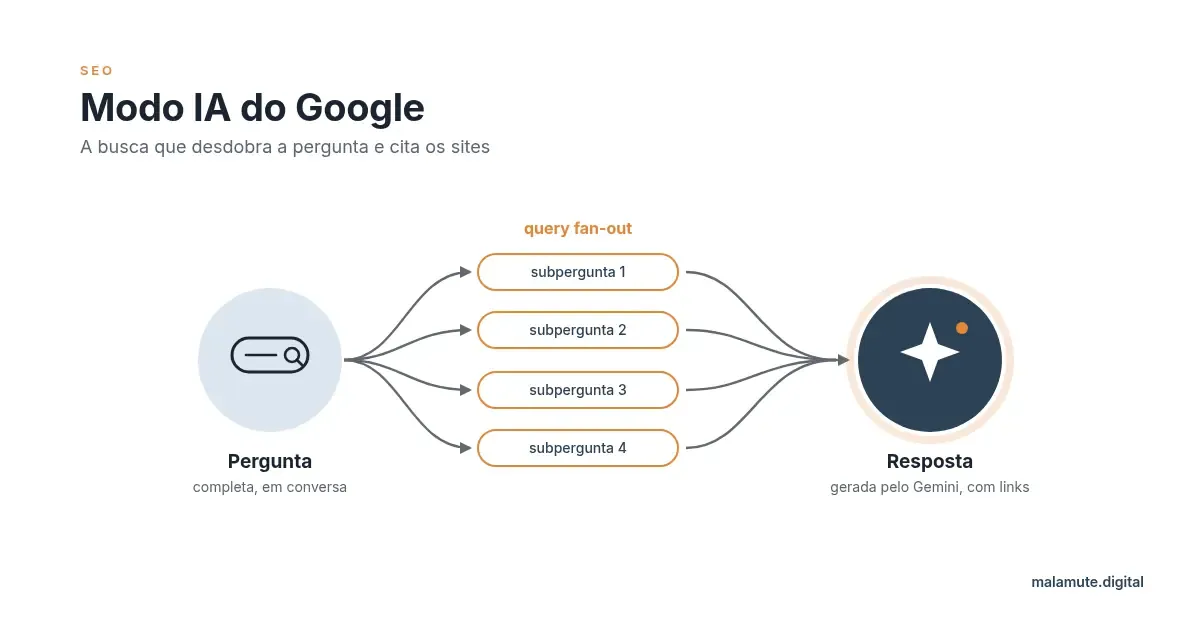
AI Mode breaks the question into subtopics, runs several searches at the same time across the web and Google’s data sources, and combines the results into an answer with links. Google calls this technique query fan-out.
AI Mode works in five steps:
- The person asks a complete question, by text, voice, image or file.
- AI Mode breaks the question into sub-questions, each covering part of the topic.
- AI Mode searches all the sub-questions in parallel, on the web and in Google’s data sources.
- Gemini synthesizes the results into a single answer, in text, lists or tables.
- AI Mode shows the supporting links and accepts follow-up questions, which restart the cycle.
Beyond the web, AI Mode draws on data from Shopping (products and prices), Maps and Google Business Profile (local businesses), as well as real-time information. That is why Search Central asks businesses to keep Merchant Center and their Business Profile up to date.
According to Search Central, AI Mode shows a broader and more diverse set of links than classic search. More links per answer means more room for different websites.
What is query fan-out in AI Mode?
Query fan-out is the technique in which AI Mode turns one question into several related searches and runs each of them at the same time. Google does not show the sub-questions, but a B2B example illustrates the logic.
The question “which SEO agency should a manufacturer in São Paulo hire” could turn into these searches:
- SEO cost for manufacturers;
- criteria for choosing an SEO agency;
- SEO agencies in São Paulo;
- B2B SEO case studies.
The consequence for SEO is direct. A site can be cited in AI Mode for answering a single sub-question well, even without ranking for the main question. Whoever covers the sub-questions of a topic has more entry points into the answer. The topic will get its own guide on query fan-out .
Which Gemini model does AI Mode use?
Since May 2026, AI Mode has used Gemini 3.5 Flash as the default model worldwide. Paid subscribers can choose other models from the menu in the “Ask anything” bar.
| Period | Model | Who has access |
|---|---|---|
| Sep/2025 (launch in Brazil) | Custom version of Gemini 2.5 | Everyone |
| Dec/2025 | Gemini 3 Flash as default | Everyone |
| May/2026 (Google I/O) | Gemini 3.5 Flash as default | Everyone |
| Oct/2026 | Gemini 4 Argon, optional, with a daily usage limit | Google AI Pro and Ultra subscribers, 18 or older |
| Nov/2026 | Gemini 4 Carbon, optional | Google AI Ultra subscribers |
The model changes often, but all of them look for sources on the web in the same way, and that is what matters for businesses. Information checked in November 2026.
What kinds of questions does AI Mode accept?
AI Mode accepts questions by text, voice, image, files (such as PDFs) and, in Chrome, open browser tabs. One example of each format:
- Text: “compare three ERPs for manufacturers in a table”.
- Voice: tap the microphone and ask “what is the difference between SEO and GEO?”.
- Image: send a photo of a part and ask where to buy it.
- Files: send the PDF of a sales proposal and ask for a summary of the deadlines.
- Chrome tabs: add open tabs to the question and ask for a comparison between the pages.
The new AI-powered search box, launched at I/O 2026, combines these formats into a single question. In April 2026, Chrome started opening the website side by side with AI Mode, first in the US; in Brazil, check your account. All five formats are already listed in the Portuguese-language Help Center.
How do you turn on and use Google AI Mode?
To use AI Mode, go to google.com/ai, tap the AI Mode tab on the results page, or open the Google app and tap AI Mode. All three paths are described in the Google Search Help Center.
On a computer:
- Go to google.com and type your question.
- Click the AI Mode tab, or go straight to google.com/ai.
- Ask follow-up questions in the “Ask anything” bar at the bottom of the screen.
On a phone (Google app for Android and iOS):
- Open the Google app.
- Tap AI Mode on the home screen.
- Type, tap the microphone or send a photo.
In Chrome:
- Open AI Mode in a search.
- Use the ”+” menu in the search bar to add open tabs, images or files.
AI Mode history, on the left side of the screen on a computer, brings back previous conversations when history and personalized recommendations are turned on. The “Good response” and “Bad response” buttons below each answer send feedback.
Why doesn’t AI Mode show up for me?
AI Mode does not appear when the country, the language or the account type is not among the cases Google supports. Four checks solve most cases:
- Check whether your country is on the Help Center list (Brazil is).
- Check whether the language is supported (Brazilian Portuguese is).
- Check the account type. In Google Workspace, the administrator controls Search history. Supervised accounts follow Family Link rules.
- Try direct access through google.com/ai.
What is the difference between AI Mode, AI Overviews and Gemini?
AI Overviews are a summary at the top of regular search, AI Mode is a conversation tab inside Search, and Gemini is a separate assistant with its own app.
| Format | Where it appears | When it appears | Answer format | Follow-up questions | Links to websites | Model |
|---|---|---|---|---|---|---|
| AI Mode | Search tab, google.com/ai and the Google app | When the person picks the tab or continues from an overview | Conversation with text, lists and tables | Yes | Yes, several per answer | Gemini 3.5 Flash (default) |
| AI Overview | Top of the regular results page | Only when the summary adds something to the search | Short summary | Yes, the conversation continues in AI Mode | Yes | Gemini, not always the same as AI Mode |
| Gemini app | Gemini app and website | When the person opens the assistant | Conversation, creation and tasks | Yes | Not the focus of the product | Gemini models, depending on the plan |
| Classic search | Results page | In every search | List of links | No | Yes | Ranking systems, no generated answer |
The practical difference is in the links: AI Mode and AI Overviews send users to websites.
At Google I/O 2026, Google merged AI Overviews and AI Mode into a single experience. People leave the overview and continue the conversation in AI Mode. At the same event, Google CEO Sundar Pichai said AI Overviews had passed 2.5 billion monthly users. Outside Google, the competition continues in chatbots with their own search, such as ChatGPT Search .
Is AI Mode available in Brazil?
Yes. AI Mode has been available in Brazil, in Portuguese, since September 8, 2025, on the web and in the Google app for Android and iOS. Robby Stein, VP of Product for Google Search, announced the launch on the Google Brazil blog (in Portuguese).
At I/O 2026, Google said AI Mode queries had more than doubled every quarter since launch. In Brazil, the search “modo ia google” averages 33,100 searches per month, according to DataForSEO (Google Ads data, collected in November 2026).
AI Mode timeline:
- May/2025: Google announces AI Mode at I/O 2025 and rolls it out in the US.
- Sep 8, 2025: AI Mode arrives in Brazil, in Portuguese.
- May 19 and 20, 2026 (I/O 2026): AI Mode passes 1 billion monthly users, adopts Gemini 3.5 Flash and merges with AI Overviews.
- Oct 28, 2026: Google announces ads in AI Mode for Brazil later in 2026.
What changes in search for businesses with AI Mode?
With AI Mode, a business competes for a place inside the AI’s answer, not just for a position in the list of links. To get there, the site needs to answer the questions Google fans out from the customer’s search. Six changes explain this:
- Longer, conversational questions: the customer describes the whole problem, and the business needs content at that level of detail.
- More sources per answer: fan-out consults more pages per question than classic search, and a business that covers the sub-questions of its market gets more chances of being cited. That is the work of AI search optimization (GEO).
- A synthesized answer before the click: the customer reads a summary before visiting any site, and the business needs to be cited in that summary to make the list of options.
- The follow-up question becomes a new query: every “and how much does it cost?” opens another search, and the business can appear in the second or third question, even if it was left out of the first.
- Structured data, Business Profile and Merchant Center feed local and shopping answers: the business’s hours, reviews, prices and stock come from these sources, not only from the site’s text.
- Ads inside the answer coming to Brazil: a business that invests in paid media will compete for the same space as the organic answer.
The goal changes: from ranking first for a keyword to being the source cited in every question that leads to a purchase. SEO remains the foundation; GEO widens the target.
Does AI Mode reduce website traffic?
AI Mode can reduce clicks on questions the answer itself resolves, but Google says clicks from pages with AI answers tend to be higher quality, with more time spent on the site. The Search Central statement refers to pages with AI Overviews: people who click from them spend more time on websites.
Google does not publish an official figure for the drop in clicks caused by AI Mode. Search Console also does not separate AI Mode traffic from the rest of search (see the section on measurement). Percentages without a primary source call for caution.
In our view, the effect varies with the type of search:
- Most affected: simple informational questions, such as definitions, dates and “what is”. This is the territory of zero-click searches .
- Least affected: comparison, local and purchase searches. The customer needs to visit the site to see prices, portfolio and contact details.
In our experience, revenue for B2B and service businesses comes from the second group. That is why SEO and GEO need to work together: one keeps the site in the rankings, the other puts the business in the answer.
How do you get your business to appear in AI Mode?
To appear in AI Mode, a page needs to be indexed and eligible to show a snippet in Google Search; there is no special optimization beyond SEO best practices, according to Google itself. The Search Central documentation “AI features and your website” lists what counts. The work follows seven steps:
- Allow Googlebot to crawl in robots.txt and check that your CDN or hosting is not blocking the bot.
- Make sure important pages are indexed, with no directives that prevent a snippet from showing.
- Cover the sub-questions of the topic (fan-out) with helpful, reliable content written for people.
- Keep important content in text, not only in images, videos or PDFs.
- Keep structured data consistent with the visible text on the page.
- Keep your Google Business Profile and Merchant Center up to date, with correct hours, prices and stock.
- Use clear internal links, so Google can find and understand the pages that answer each sub-question.
These seven steps make a page eligible, but Google does not guarantee it will be shown; the quality of the answer decides who gets cited.
In the Malamute method, which is agency practice and not a Google rule, the work goes beyond the basics. First, we keep the brand’s entities consistent across the web: name, services, address and specialists matching on the site, the Business Profile and external profiles. Next, we seek mentions of the business in reliable industry sources. Finally, we monitor AI Mode answers for the questions that lead to a purchase and adjust the content when the business is not cited. That is what we deliver in our GEO service. To go deeper into the technical side, read the SEO for AI guide.
Do you need llms.txt or special schema for AI Mode?
No. Google says there is no need to create AI files, machine-readable files or special schema.org markup to appear in AI Mode. llms.txt may have a use in other AIs, but it is not a requirement for Google Search. Structured data is still useful for rich results, as long as it reflects the visible text on the page. In AI Mode, the payoff is in the content, the indexing and the consistency of the brand.
How do you measure AI Mode in Google Search Console?
AI Mode traffic is included in the Search Console Performance report, under the Web search type, together with the rest of search. Google Search Console counts AI Mode with four rules, according to the Search Console Help Center:
- Click: clicking a link to an external page inside AI Mode counts as a click.
- Impression: the standard Google Search impression rules apply.
- Position: position in AI Mode follows the same methodology as a regular results page.
- Follow-up question: each follow-up question counts as a new query, with its own impressions, clicks and position.
Since August 31, 2026, Search Console has offered the generative AI performance report for all sites. The report shows impressions in AI Overviews and AI Mode together, by page, country, date and device, without queries and without clicks.
The fourth rule explains short queries such as “yes” in the Performance report: they are AI Mode follow-up questions. Google’s John Mueller confirmed that the general report includes AI Overviews and AI Mode data. In the industry’s reading, very long, conversational queries are another likely sign.
To measure revenue, use GA4. Search Console does not measure conversions. To go beyond Google, it is worth measuring your brand’s visibility in AI tools .
Will there be ads in AI Mode in Brazil?
Yes. On October 28, 2026, Google announced that it will bring ads to AI Mode in Brazil later in 2026, with no exact date. The source is the Google Brazil blog (in Portuguese). Three facts define the format:
- There is no separate campaign: existing Search, Shopping and Performance Max campaigns take part automatically, with no budget of their own.
- Ads will carry the “Sponsored” label: paid media does not influence the AI’s organic answer.
- Ads above and below AI Overviews already appear today: this format is already live in Brazil.
The Google Ads Help Center does not yet list Brazil for ads inside AI Mode; check there before planning budget. Information checked in November 2026.
As a result, SEO and paid media will compete for the same space in the answer. Google Ads management and SEO need to be planned together.
How do you control the use of your content in AI Mode?
The controls are the same as in Google Search: robots.txt for Googlebot, and the nosnippet, data-nosnippet, max-snippet and noindex directives to limit what appears.
| Control | What it does | Effect in AI Mode |
|---|---|---|
| robots.txt (Googlebot) | Blocks crawling of pages or folders | The page is no longer read and cannot serve as a source |
| nosnippet / data-nosnippet | Prevents a snippet from showing for the whole page or a block | The blocked content does not enter the answer |
| max-snippet | Limits the length of the snippet shown | The answer uses at most the allowed snippet |
| noindex | Removes the page from Google’s index | The page does not appear in Search or in AI Mode |
Google-Extended does not remove a site from Search or from AI Mode. It applies to other Google AI systems. Blocking snippets also reduces the chance of the business being cited.
Where should you start preparing your business for AI Mode?
Start by checking whether the pages that generate revenue are indexed and answer the questions customers ask before buying. Five tasks cover the first week:
- Confirm in Search Console that service and product pages are indexed.
- List the 20 questions customers ask before buying and mark the ones the site already answers.
- Review robots.txt and the CDN to make sure Googlebot can crawl the site.
- Update your Google Business Profile and Merchant Center.
- Test your market’s questions in AI Mode and note who gets cited.
If the list revealed gaps, Malamute runs an AI optimization assessment of your site. The assessment points out the missing pages and questions and what to fix first. For the technical review, see the SEO audit guide.
Also available in: Português · Italiano · Español
Want to turn organic search into revenue?